
Mobile-First Pool Websites: Why Most Pool Service Companies Are Designing Backward
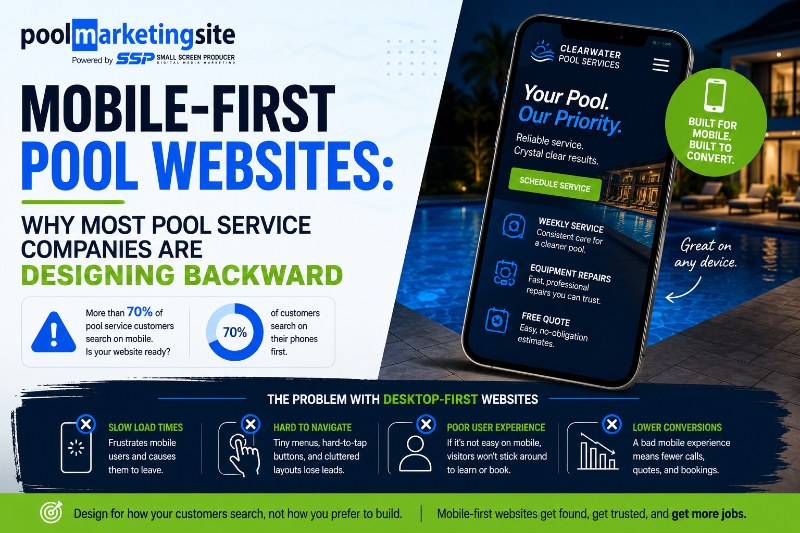
Designing a pool service company website backward means starting with the desktop experience and then trying to make it work on mobile — the device that the majority of homeowners use to search for pool service. Mobile-first design means the opposite: building for the phone screen first, then scaling up. The distinction is significant, and it shows up directly in your Google rankings and your lead count.
Here’s a scenario that plays out thousands of times every day across every pool service market in the country. A homeowner’s pump starts making a new noise on a Thursday morning. They pull out their phone and search ‘pool service company near me.’ Four listings come up. They tap the second one. The site takes four seconds to load. When it finally does, the text is tiny, the menu is impossible to open with a thumb, and the phone number — when they finally find it — isn’t a tap-to-call link.
They go back. They tap the third listing instead.
That first pool service company lost a job — and they’ll never know it happened.
💼 LinkedIn Extract — Ready to post:
Mobile devices account for more than half of all pool service company website traffic.
Most of those sites were designed for a desktop.
Here’s what designing backward costs you — and what mobile-first looks like in practice.
[link to blog] #PoolService #MobileFirst #PoolMarketing #WeSpeakPoolAndSpa
What ‘Designing Backward’ Actually Means
Traditional web design process: build a full-featured desktop website, then create a ‘responsive’ version that attempts to compress the desktop layout for smaller screens. This approach produces websites that technically work on mobile but weren’t designed for mobile — the navigation is condensed but awkward, the text is readable but small, the contact paths are available but not optimized.
Mobile-first design reverses this. The primary design canvas is the smartphone screen. Every element — navigation, typography, button sizing, page hierarchy, contact placement — is designed specifically for the thumb and the small screen first. The desktop version is then scaled up from that mobile foundation, not the other way around.
For pool service companies, where the majority of leads arrive from mobile searches, this distinction is not academic. It’s the difference between a website that converts mobile visitors and one that frustrates them.
Why Pool Service Company Traffic Is Especially Mobile-Heavy
Pool service company searches skew mobile more heavily than pool builder searches because of the nature of the intent. A homeowner researching a custom pool build might spend time on their laptop doing extensive comparison research. But a homeowner searching for pool service — especially urgent service — is overwhelmingly on their phone, in the moment, looking for a fast answer.
‘Pool service company near me,’ ‘pool repair,’ ‘green pool fix’ — these searches happen at 7am, on a Saturday, at the side of the pool, from a phone. The homeowner is not going to wait until they get to a desktop to contact you.
Google Penalizes the Backward Approach
Since 2019, Google has used mobile-first indexing — meaning it primarily evaluates the mobile version of your website when determining where to rank you. A pool service company with a great desktop site but a poor mobile experience ranks lower than competitors whose mobile experiences are well-built.
In the context of local search — where appearing in the Google Maps top three results can be the difference between a full service schedule and a slow quarter — mobile performance is a direct ranking factor with direct revenue implications.
The 5 Elements That Must Work Perfectly on Mobile
1. Phone Number: Tap-to-Call From Every Page
The single most important mobile element for a pool service company. Every page should have your phone number visible and tappable — not as plain text that requires copying and pasting, but as a tel: link that dials immediately. A sticky header that remains visible as visitors scroll, with a tap-to-call phone number, is the minimum standard.
2. Service Request Form: Three Fields Maximum on Mobile
Contact forms that ask for name, email, phone, service address, pool size, preferred service frequency, equipment details, and how you heard about us are desktop experiences. On mobile, they’re abandonment triggers. Three fields — name, phone, brief description of what’s needed — is the mobile standard for a service request form.
3. Navigation: Thumb-Accessible Menu
Complex dropdown navigation menus are difficult to use with a thumb on a touchscreen. Mobile navigation should be simple — a hamburger menu that opens cleanly, with primary destinations reachable in one or two taps. Service types, service area, and contact should all be within immediate reach.
4. Page Speed: Under 3 Seconds on Mobile Connection
A pool service company website that loads in under three seconds on a mobile connection captures 53% more of its traffic than one that takes six or seven seconds. Run your site through pagespeed.web.dev on the mobile tab — if your score is below 70, you have work to do.
5. Chat Widget: Opens and Closes Without Breaking the Experience
Chat widgets are powerful lead capture tools for pool service companies — but poorly implemented ones that take over the screen, are difficult to dismiss, or break the page layout on mobile do more harm than good. Test your chat widget specifically on mobile before considering it deployed.
Frequently Asked Questions
Is responsive design the same as mobile-first design?
No — and this is a common source of confusion. Responsive design means the website adapts to different screen sizes. Mobile-first design means the website was designed with the mobile experience as the primary canvas. A responsive website designed desktop-first is technically responsive but often produces a compromised mobile experience. A mobile-first responsive website provides an excellent experience on phones and scales up gracefully for larger screens. Pool Marketing Site builds all pool service company websites as mobile-first responsive.
How do I tell if my current pool service company website is truly mobile-friendly?
The most direct test: use your own smartphone to browse your website as a homeowner would. Try to call the business, fill out a service request form, and navigate to your service area page — all on the phone. Time each action. If anything takes more than two or three taps or requires zooming, it’s a friction point. For a technical assessment, run your site through Google’s mobile-friendly test at search.google.com/test/mobile-friendly — it will identify specific issues affecting your mobile usability.
Can I convert my existing desktop-first pool service website to mobile-first?
To some extent — adding a sticky tap-to-call header, simplifying the navigation for mobile, and shortening contact forms can all be done on an existing site. But truly mobile-first design sometimes requires rebuilding the site’s layout from scratch, especially if the existing site uses a template that wasn’t designed for mobile-first use. Pool Marketing Site can audit your existing website and determine whether optimization or rebuilding better serves your lead generation goals.
Pool Service Company Websites Built Mobile-First
Pool Marketing Site builds mobile-optimized pool service company websites that rank locally and convert the homeowners searching for you on their phones.