
8 Signs Your Pool and Hot Tub Retailer’s Google Ads Are Wasting Money Right Now
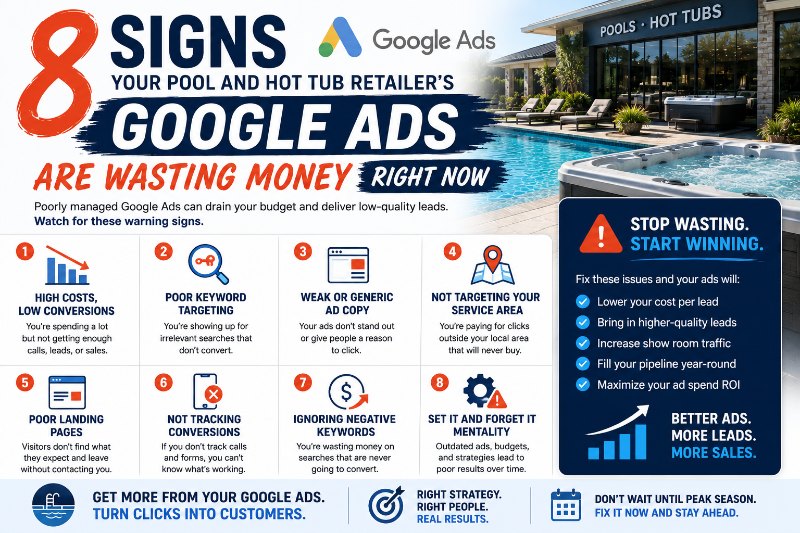
Eight specific signs indicate that a pool and hot tub retailer’s Google Ads are wasting budget: a high click volume with few leads, showing ads to searchers outside the service area, no negative keyword list blocking irrelevant searches, no conversion tracking beyond page views, ads running on the homepage rather than dedicated landing pages, the same ads running year-round without seasonal adjustment, no call tracking for phone leads, and Quality Scores below 5 on primary keywords. Each sign represents a specific, fixable problem — not a reason to stop running Google Ads.
Pool and hot tub retailer Google Ads waste budget in predictable patterns. The problems below don’t happen because Google Ads don’t work for pool and hot tub retailers. They happen because pool and hot tub retailer accounts are often set up once and left running — with no one actively monitoring, optimizing, and catching the issues that accumulate over time.
Check your account against these 8 signs right now.
Sign 1: High Click Volume, Few Leads
If your Google Ads are generating a lot of clicks but very few of those clicks result in form submissions, phone calls, or showroom visit inquiries, the problem is usually one of three things: the ads are reaching the wrong audience (wrong keywords or targeting), the landing page isn’t matching the ad’s promise and is causing visitors to bounce, or the landing page lacks a clear conversion path (no visible form, no tap-to-call, no scheduling option).
What to do: Pull your Search Terms Report to identify what searches are actually triggering your ads. Review your landing page on mobile — does it load fast, does the headline match the ad, is there an obvious next step? A landing page conversion rate below 2% for pool and hot tub retailer ad traffic typically indicates a landing page problem worth fixing.
Sign 2: Ads Showing Outside Your Service Area
A pool and hot tub retailer whose showroom serves customers within a 50-mile radius has no business interest in paying for clicks from homeowners 100 miles away. Yet geo-targeting misconfiguration — particularly when campaigns are set to ‘presence or interest’ rather than ‘presence’ only — regularly serves ads to people who are researching pool products in your city without being physically located there.
What to do: Check your geographic targeting settings and ensure the location option is set to ‘Presence: people in or regularly in your targeted locations’ rather than ‘Presence or interest.’ Review the geographic performance report to identify locations generating clicks without conversions and exclude them.
Sign 3: No Negative Keywords
A pool and hot tub retailer running ads without a negative keyword list is paying for clicks from searchers who are looking for pool table accessories, inflatable kiddie pools, DIY hot tub chemistry guides, job openings at pool companies, and dozens of other irrelevant searches that Broad Match and Phrase Match keywords can trigger. These clicks generate real charges with zero conversion potential.
What to do: Build a negative keyword list immediately. Start with: ‘DIY,’ ‘how to,’ ‘table’ (for pool table searches), ‘inflatable,’ ‘kiddie,’ ‘jobs,’ ‘hire,’ ‘parts only,’ ‘used’ (if you don’t sell used products), ‘repair manual,’ and any competitor-specific terms that aren’t part of a deliberate conquest strategy. Review the Search Terms Report weekly and add new negative keywords as they appear.
Sign 4: Conversion Tracking Not Set Up Correctly
If your Google Ads conversion tracking only shows ‘All website sessions’ or ‘Page views’ as conversions, you’re not tracking actual business outcomes. Without proper conversion tracking — form submissions, phone calls, scheduling completions — Google’s smart bidding can’t optimize for the actions that actually matter, and you have no way to calculate cost per lead.
What to do: Audit your conversion actions in Google Ads. You should have at minimum: a form submission conversion (triggered by the thank-you page or inline form completion), a call extension conversion (phone calls from the ad), and a website call conversion (phone number clicks on landing pages). Google Tag Manager simplifies conversion setup for retailers with multiple pages and forms.
Sign 5: Ads Pointing to the Homepage
A homeowner who clicks an ad for ‘hot tubs for sale near me’ and lands on a general retailer homepage — where they must scroll, navigate, and work to find relevant information — converts at a fraction of the rate of one who lands on a dedicated hot tub page with lifestyle images, product options, financing information, and a clear call to action. Homepage traffic from ads is systematically underperforming compared to purpose-built landing pages.
What to do: Create dedicated landing pages for each major product category and campaign type — hot tubs, above-ground pools, swim spas, seasonal promotions. Each landing page should match the ad’s headline, show relevant products or services, include trust signals, and present a single clear conversion action. Even a simple service or product page is more effective than the homepage as an ad destination.
Sign 6: Same Ads Running Year-Round
Pool and hot tub retail is highly seasonal. Spring pool ads, fall hot tub promotions, and holiday gift campaigns serve very different audiences with very different motivations. A retailer running the same generic ad copy in January and July is not optimizing for what’s actually driving purchase decisions in each season — and is likely missing seasonal promotional opportunities that drive higher conversion rates than evergreen messaging.
What to do: Build a seasonal ad calendar. Create separate ad groups with seasonal messaging for: spring pool opening promotions (March-May), summer pool accessories and upgrades (June-August), fall hot tub season (September-November), and holiday gifting (December). Schedule ad groups to activate and pause based on the calendar without manual intervention.
Sign 7: No Call Tracking for Phone Leads
Many pool and hot tub retail purchases are initiated with a phone call — a homeowner who wants to confirm you have a specific model in stock, ask about current promotions, or schedule a showroom visit. Without call tracking connected to Google Ads, all phone leads are invisible in campaign reporting, and you’re under-counting conversions significantly.
What to do: Enable call extensions with conversion tracking in Google Ads and add a dynamic number insertion script to your website that swaps the displayed phone number for a Google forwarding number when a visitor arrives from an ad. This connects phone calls to specific keywords and campaigns, giving you the full lead picture rather than just form submissions.
Sign 8: Quality Scores Below 5 on Primary Keywords
Quality Score is Google’s 1-10 rating of how relevant your keyword, ad, and landing page are to the searcher’s query. Quality Scores below 5 on primary keywords mean you’re paying a ‘low relevance’ premium — higher CPCs and worse ad positions than competitors with higher Quality Scores. A pool and hot tub retailer with Quality Score 4 on ‘hot tubs for sale near me’ is paying significantly more per click and ranking lower than one with Quality Score 8 for the same keyword.
What to do: Check Quality Scores for all primary keywords in the Google Ads keyword view. For low-scoring keywords, identify which component is driving the low score — Google breaks Quality Score into expected CTR, ad relevance, and landing page experience. Improve the weakest component: rewrite ad copy to improve relevance, optimize the landing page for faster load time and better user experience, or revise the keyword match type to be more precise.
Frequently Asked Questions
How do I access the Search Terms Report to see what's triggering my pool retailer's ads?
In Google Ads, navigate to your campaign, then the ad group, then click ‘Keywords’ in the left navigation. At the top of the keywords view, select ‘Search Terms.’ This shows every actual search query that triggered an impression of your ad, along with performance data for each query. Sort by spend or impressions to find the highest-impact irrelevant terms. Any query that’s triggering your ad and is clearly irrelevant to your pool and hot tub retail business should be added as a negative keyword immediately.
Is it worth fixing a Google Ads campaign or better to start fresh?
In most cases, fixing an existing campaign is preferable to starting fresh — because the existing campaign has historical data, ad history, and Quality Score development that a new campaign lacks. Even a poorly performing campaign has valuable information: the Search Terms Report shows what people are actually searching, the geographic performance data shows where your best leads come from, and the keyword performance data shows which terms have any conversion history. Starting fresh forfeits all of that. The exceptions are campaigns with severe structural problems (no conversion tracking, completely wrong geographic targeting) where the existing data is misleading rather than useful.
How long does it take to see improvement after fixing these issues?
Some fixes produce immediate impact: adding negative keywords stops irrelevant spend immediately. Fixing geographic targeting stops out-of-area spend within hours of the change. Landing page improvements affect conversion rates starting with the next visitor. Quality Score improvements take longer — Google recalculates Quality Score with each auction based on recent performance, so improving ad relevance and landing page experience produces gradual Quality Score improvement over 2 to 4 weeks. Overall campaign performance improvements after systematic fixes are typically visible within 30 to 60 days, with cost-per-lead improvements continuing over the following 90 days.
Stop Wasting Budget — Get a Google Ads Audit for Your Pool or Hot Tub Retail Business
Pool Marketing Site audits pool and hot tub retailer Google Ads accounts, identifies exactly where budget is being wasted, and fixes the problems
before managing campaigns for maximum ROI.